Sub-Zero Classic Series (BI) Freezer Drawer Removal
Topics:
- How to remove and insert the freezer drawer in a Classic Series (BI)
- How to remove the freezer baskets in a BI over-and-under
- Can the entire freezer drawer on an over-and-under BI unit be removed?
Answer:
Classic series (BI) drawer removal varies by model. Starting with serial number 4250000, drawers have tab releases along the front edge in the white part of the drawer. Press the tabs to remove the clear drawers.
- See also, Sub-Zero Serial Tag Locations.
To remove the drawer in the BI-36F and Side-by-Side model:
- Pull the drawer forward until the basket stops.
- Pull the two clips behind the bottom front two corners of the basket forward, then lift up and out.
- To install, push drawer slides in.
- Align the basket with the slides and push it back until it stops.
- Press down on the front of the basket to engage slides.
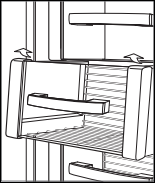
- To install, insert the lower basket into the four corner retainers. See also, 600 and Classic Series Over Under Freezer Basket Retainers.
- Position the upper basket onto the side rails and slide it back until it clicks.
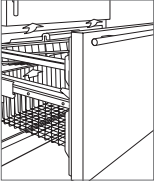
- To remove the entire freezer drawer assembly, the drawer must be disassembled from the slides.
- Sub-Zero recommends that a service technician disassemble the drawer if necessary.
For custom panel dimensions and installation information, refer to the product Installation Guide.
Refer to the product Use and Care Guide for further information.
DID THIS ANSWER YOUR QUESTION?

We're standing by with answers
Whether you're shopping for appliances or have questions about those you already own, we've got the resources you need. Talk directly to a customer care expert at the Sub-Zero, Wolf, and Cove service center, or connect with an appliance consultant at an official showroom near you. Get quick answers online, or reach a certified service provider or installer. And much more.
Call us at (800) 222-7820